

 Centric PLM
 Centric Planning
 Centric Pricing & Inventory
 Centric Market Intelligence
 Centric Visual Boards
 Centric PXM
 Experience Academy


 Fashion & Apparel
 Retail
 Footwear
 Outdoor & Sports
 Consumer Goods
 Manufacturers
 Home Décor & Furniture
 Food and Beverage
 Grocery Retail
 Cosmetics & Personal Care
 Consumer Electronics









What Is ASIN? A Guide to Amazon’s Product Identification Numbers

Amazon sells over 350 million products. How does it keep track of them all?
A system built for precision, that keeps every item searchable, organized and ready to ship.
At the center of that system is the ASIN. This 10-character code drives product discoverability, links listings across sellers and keeps catalog data consistent across marketplaces.
For brands and retailers, understanding ASINs is essential. From listing accuracy to operational efficiency, they provide the structure to stay competitive on Amazon’s digital shelf.
What is an ASIN?
An ASIN, or Amazon Standard Identification Number, is a unique 10-character alphanumeric code assigned to each product listed on Amazon. It functions as an internal identifier that supports cataloging, search and product tracking within the platform. Products without an ASIN cannot be sold or discovered through Amazon’s marketplace.
Most ASINs begin with “B0”, although exceptions exist, such as books published before 2007, which often use their ISBN as the ASIN. Examples of ASINs include B07FZ8S74R and 0451524934. These codes serve as unique keys that help maintain consistency across Amazon’s product ecosystem.
ASIN vs. UPC, ISBN and EAN
ASINs are Amazon-specific and do not apply outside of its ecosystem. In contrast, UPC (Universal Product Code), ISBN (International Standard Book Number) and EAN (European Article Number) are global identifiers issued by third parties like GS1 or ISBN agencies.
How each code differs:
| Code | Full Name | Issued By | Common Usage |
| ASIN | Amazon Standard Identification Number | Amazon | Amazon marketplaces |
| UPC | Universal Product Code | GS1 | Global retail and e-commerce |
| ISBN | International Standard Book Number | ISBN agencies | Books, publishing |
| EAN | European Article Number | GS1 | Retail, primarily Europe |
Within Amazon’s ecosystem, the ASIN serves as the definitive product identifier. Because ASINs are marketplace-specific, a single product can have different ASINs on Amazon.com, Amazon.co.uk and other regional sites.
Why ASINs matter in the Amazon ecosystem
ASINs support the core functions of Amazon’s marketplace, from product tracking and inventory control to search accuracy and policy compliance.
Product tracking and cataloging
For Amazon:
ASINs uniquely identify and classify products across categories and regions. This structure eliminates duplicates and keeps the catalog organized.
For sellers:
ASINs link identical items to a shared detail page, reducing catalog clutter and avoiding redundant listings. Clean ASIN data improves discoverability, supports compliance and builds customer trust.
Inventory and listing management
For Amazon:
ASINs connect listings to inventory systems, enabling real-time stock visibility and fulfillment accuracy.
For sellers:
Linked inventory enables sellers to monitor availability, track sales and prevent overselling.
Customer search and browse functionality
For Amazon:
ASINs enable clean, consolidated search results by grouping identical items and surfacing the most relevant offers.
For sellers:
Optimized ASIN content, like titles, keywords, bullet points, improves visibility, eligibility for recommendations and overall ranking in search..
Seller performance and compliance
For Amazon:
ASINs enforce catalog standards, enabling Amazon to detect misclassified listings, variation misuse and policy violations.
For sellers:
Accurate ASIN use helps prevent listing suppression, account penalties and compliance issues. Clean data supports stable performance and protects long-term marketplace access.
With so much riding on accurate ASIN usage, knowing exactly where to locate these identifiers becomes essential for maintaining control over listings and operations.
Where to find an ASIN
ASINs appear in multiple locations across the platform:
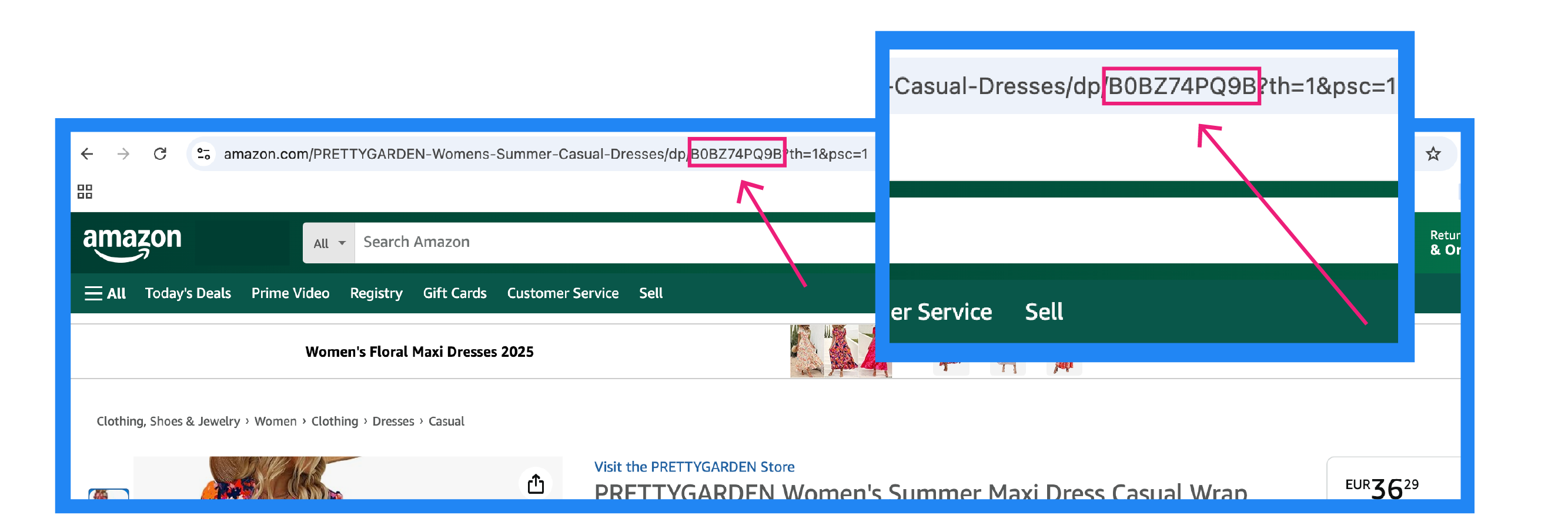
- Product URL
ASINs are embedded directly into the URL of each product detail page.
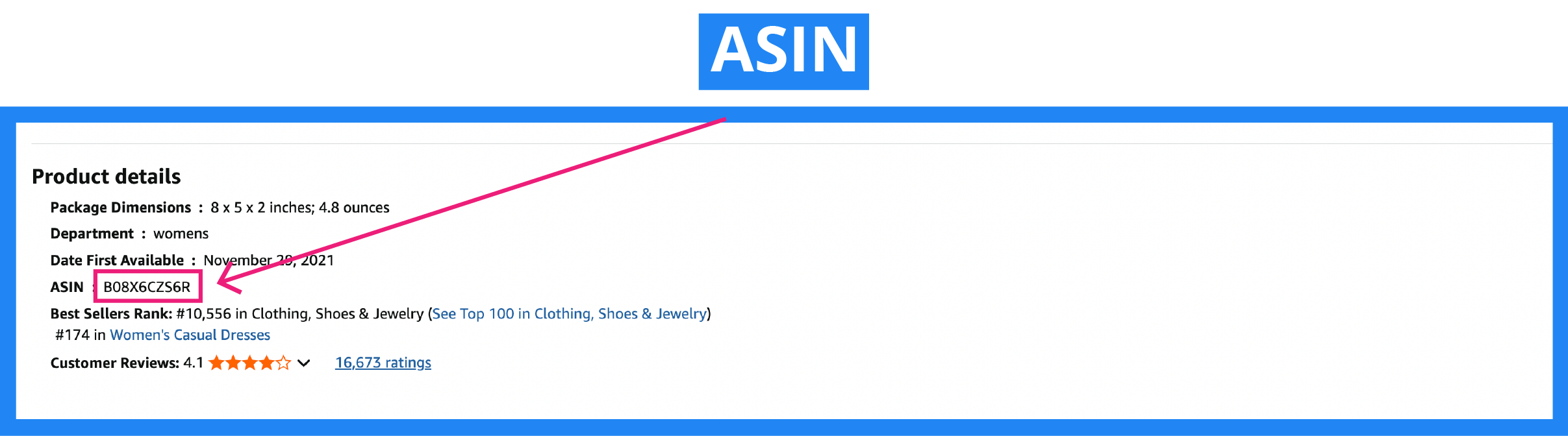
- Product information section
On any product detail page, the ASIN is listed in the technical or additional information section, typically alongside dimensions, manufacturer details and model numbers.
- Seller Central dashboard
For brands and retailers managing listings through Amazon Seller Central, ASINs are included in the catalog view and product detail screens, making them easily accessible for tracking and updates.
- Third-party tools
Platforms like Helium 10 Chrome Extension, ASINspector and ASINTool provide additional ways to search, extract and manage ASIN data, which is especially helpful when auditing catalogs or researching competitors.
How to create an ASIN
Before listing a product on Amazon, sellers must determine whether to create a new ASIN or contribute to an existing one. Amazon’s catalog is designed to reduce duplication, so understanding when and how to generate ASINs is critical to maintaining catalog integrity.
Most ASINs are generated from GTINs such as UPC, EAN or ISBN. A valid GTIN is typically required to create a new ASIN unless the product qualifies for a GTIN exemption.
When to create a new ASIN
A new ASIN is required when listing a product that does not yet exist in Amazon’s marketplace. This includes unique products, private-label items or any listing that differs in format, packaging, edition or variant from what already exists.
When to use an existing ASIN
If the product matches an existing item already in the Amazon catalog, including identical brand, model and specifications, it must be listed under the existing ASIN. Amazon’s system will automatically associate that product with the correct listing, consolidating all sellers under a single detail page.
Methods of ASIN creation
- Manual: For one-off listings or simple catalogs
Amazon’s “Add a Product” tool inside Seller Central allows direct ASIN creation, one product at a time. This method works best for small-scale sellers or low-volume product additions that don’t require bulk operations or automation.
- Bulk: For growing catalogs that need structure
Amazon’s Excel-based templates support ASIN creation in bulk. Product data is entered into structured spreadsheets and uploaded via Seller Central. It’s faster than manual entry but still requires hands-on data prep and validation.
- Automated: For brands scaling across channels and marketplaces
Automated systems like Centric PXM™ enable seamless ASIN creation. These tools streamline data mapping, validation and enrichment to ensure clean and compliant product listings.
Managing ASINs effectively
Catalog chaos often begins with duplicated ASINs or inconsistent variation mapping. In categories like apparel, where styles, colors and sizes multiply quickly, mismanaging parent-child relationships can lead to fragmented listings or suppressed products. Brands can avoid these pitfalls by aligning to Amazon’s variation guidelines and regularly auditing for duplicate entries.
Monitor performance and version history
ASINs function as persistent identifiers, making them ideal anchors for performance tracking over time. Metrics such as sales velocity, return rate and page views can help surface product-level issues. For example, an electronics brand might track performance drops tied to changes in product content or packaging. Versioning tools within data management systems help capture this history and make it actionable.
Avoid duplication and data drift
Listing the same product multiple times, especially across regions, creates catalog bloat and confuses both customers and Amazon’s algorithm. This is particularly common in food and beverage, where packaging formats vary slightly by market. A centralized system reduces duplication risk by enforcing consistency at the point of syndication.
Use PIM platforms to centralize ASIN management
Platforms like Centric PXM’s PIM allow brands to manage ASINs and product data in one source of truth. They enforce rule-based data governance, automate content syndication across Amazon marketplaces and support cross-market collaboration.
For example, a global fashion brand managing thousands of SKUs across seasonal collections can use Centric PXM to organize ASINs, localize product content and track updates, ensuring that a size 38 black blazer in Italy doesn’t show up as a size 6 navy jacket in the US.
Need to add some copy between these header sections.
ASINs and listing optimization
ASINs power key levers for visibility and advertising and drive meaningful gains in discoverability and conversion.
Improve SEO and ad performance
Each ASIN anchors a product detail page that Amazon indexes for both organic search and paid placements.
- Use front-end and backend keywords to align with search intent and expand visibility.
- Optimize images and video to meet quality standards and boost click-through and conversion rates.
- Encourage positive reviews to support trust and improve ranking.
- Monitor performance metrics like CTR and conversion rate to guide content and PPC strategy.
Leverage ASIN for competitor research
ASINs offer a direct lens into competitive strategy. Tools like reverse ASIN lookup reveal how other products perform, allowing brands refine their own positioning.
- Analyze product content by reviewing competitor titles, descriptions and reviews to spot gaps and opportunities.
- Monitor ad performance by targeting competitor ASINs in PPC campaigns to assess visibility and adjust bidding strategies.
- Track pricing and promotions to stay competitive and identify trends across peak seasons or market shifts.
- Study top sellers in target categories to uncover patterns in content, reviews or variation structure that contribute to performance.
Support buy box strategy and sales ranking
Amazon assesses a range of performance metrics when determining Buy Box eligibility, many of which are linked to specific ASINs. Well-managed product data supports accurate evaluations and helps surface the strongest offers.
- Fulfillment and shipping performance
Metrics like delivery time, tracking accuracy and cancellation rates are often tied to ASINs and impact offer visibility.
- Seller comparison by listing
Amazon compares offers on the same ASIN using data like price, availability and fulfillment quality.
- Inventory consistency
Real-time stock accuracy helps prevent Buy Box loss due to stockouts or listing errors.
- ASIN-level insights
Performance reports segmented by ASIN surface issues early, enabling faster corrective action.
Common ASIN mistakes and how to avoid them
Small ASIN mistakes can lead to suppressed listings, policy violations or lost sales. Brands need systems in place to prevent them.
Creating duplicate ASINs
Accidentally creating multiple ASINs for the same product fragments search visibility, splits reviews and violates Amazon’s listing policy. These duplicates create unnecessary catalog clutter and confuse both customers and internal systems. To prevent them, use centralized product data management tools like Centric PIM and always check for existing ASINs before listing.
Failing to sync data across marketplaces
When ASIN content drifts between regions, listings become inconsistent or noncompliant. Inaccurate localization, outdated copy or mismatched specs can all trigger customer confusion or listing errors. A central feed management solution like Centric PXM’s Feed Management capability reduces the risk of market-specific discrepancies.
Mismanaging product variations
Incorrect parent-child relationships can cause miscategorized listings and inconsistent customer experiences. This is especially risky in categories with size, color or format variations. Following Amazon’s variation structure ensures products are organized clearly and comply with platform expectations.
Ignoring ASIN limits for new sellers
New seller accounts have restrictions on how many ASINs they can create. Attempting to bypass these limits may result in listing blocks or account review. Staying within approved thresholds helps preserve account health and sets a foundation for future expansion.
ASIN precision with Centric PXM
ASINs are central to how Amazon organizes and sells products. For brands, managing them effectively impacts visibility, performance and compliance.
Manual processes don’t scale. They lead to errors, suppressed listings and lost revenue. Brands need systems that can centralize content, enforce data standards and adapt to marketplace requirements.
Centric PXM combines Product Information Management (PIM) and Feed Management to manage ASINs at scale. PIM governs, enriches and validates product data in one AI-powered source of truth. Feed Management transforms that data into channel-specific formats, adjusting structure, taxonomy and technical specs to meet Amazon’s requirements.
The result: accurate listings, consistent catalog data and reduced risk across all marketplaces.